I run Mistborn as the self-hosted VPN platform on the small Hetzner box that handles every device in my house and a couple of client laptops. After a few years of daily use I have opinions about where it earns the extra moving parts and where plain Wireguard would have been smarter. This post is the actual install pattern I ship: Debian 12, a one-line installer, DNSCrypt switched to Cloudflare-only, Pi-hole loaded with two adlists, and the rest left at sensible defaults.
Mistborn bundles a Wireguard VPN, a Pi-hole DNS sinkhole, an encrypted upstream resolver, and a host firewall behind one web UI. About forty minutes from a fresh Debian box to a working tunnel with ad-blocking and encrypted DNS for every peer on it. If you only want a tunnel, this is more machinery than you need. If you want one box that does router-style work for any device that joins it, read on.
What Mistborn actually is
Underneath the “virtual private cloud platform” pitch, you get four things wired together:
- Wireguard for the tunnel. UDP-only, famously stealthy because it ignores unsolicited packets.
- Pi-hole for DNS-level ad and tracker blocking on every peer.
- dnscrypt-proxy as the upstream resolver, so Pi-hole’s outbound queries leave the box encrypted.
- A host firewall locked down to the Wireguard interface and the public Wireguard listener.
The Mistborn UI sits on top of all of this with peer management, adlist controls, DNS settings, and an optional SIEM view. The trade is fewer moving parts to administer manually in exchange for a stack you cannot easily mix and match with other services on the same box.
Why Debian 12 and not anything else
The installer targets Debian’s package layout, systemd conventions, and iptables stack. The README says Debian 12 and means it. It runs on Ubuntu in some cases, but the maintainer tests on Debian and the install hooks assume that environment. When something silently misbehaves (firewall rules not loading, DNS flaking, the UI throwing 500s on first boot), you are debugging the platform, not your config.
Spin up Debian 12 on a 2GB VPS, tighten it with the Linux server security fundamentals checklist before the installer runs, then run the installer. A 1GB box handles a single-user tunnel; 2GB is the sweet spot once Pi-hole caches real query volume.
The installation
Mistborn ships a one-line installer. That is the install. Two commands and a reboot.
git clone https://gitlab.com/cyber5k/mistborn.git
sudo -E bash ./mistborn/scripts/install.sh
The installer pulls Docker if it is not present, sets up the Mistborn systemd unit, configures iptables, generates the initial Wireguard keys, and walks you through setting an admin username and password.
A few things the on-screen prompts undersell:
- Use an alphanumeric admin password. The wizard accepts symbols, but the UI’s authentication layer has been brittle around special characters. Letters and digits, 20+ characters, into your password manager before you press enter.
- Set a root password before you reboot with
passwd, so you can recover from the console if something goes wrong on first boot. - Reboot when the installer says to. The iptables rules and Wireguard module load cleanly on a fresh boot. Skipping the reboot is how you end up with half-applied firewall state.
After the reboot, the Mistborn admin UI is reachable on the Wireguard tunnel address shown at the end of the installer output. The UI does not bind to the public interface by default; you import the admin Wireguard config, connect to the tunnel from your laptop, and only then can you reach it.

The admin UI as it appears after first login. Peer management, DNS settings, and adlist configuration all live behind one screen.
Switching DNSCrypt to Cloudflare-only
The default DNSCrypt configuration rotates between a mixed list of upstream resolvers. In theory this spreads your DNS metadata across providers; in practice it adds latency and gives you a worst-of-all-worlds privacy posture, because any one of them could be logging.
I switch DNSCrypt to Cloudflare-only on every Mistborn box. 1.1.1.1 is the fastest public resolver I have measured, supports DoH cleanly, and has a public privacy policy I am willing to live with. The trade is that Cloudflare sees all your DNS traffic; the alternative is several providers each seeing some of it.
Edit the base config:
nano /opt/mistborn/base.ymlScroll to the dnscrypt-proxy service block. On the DNSCRYPT_SERVER_NAMES= line, replace whatever is there with:
DNSCRYPT_SERVER_NAMES=['cloudflare']Save, exit, reboot the box. After the reboot, every DNS query that passes through Pi-hole leaves the server encrypted to Cloudflare over DoH.
rebootVerify it from a peer on the tunnel by visiting Cloudflare’s resolver test page at 1.1.1.1/help. The page will tell you whether you are using 1.1.1.1 and whether DoH is active. Both should be green.
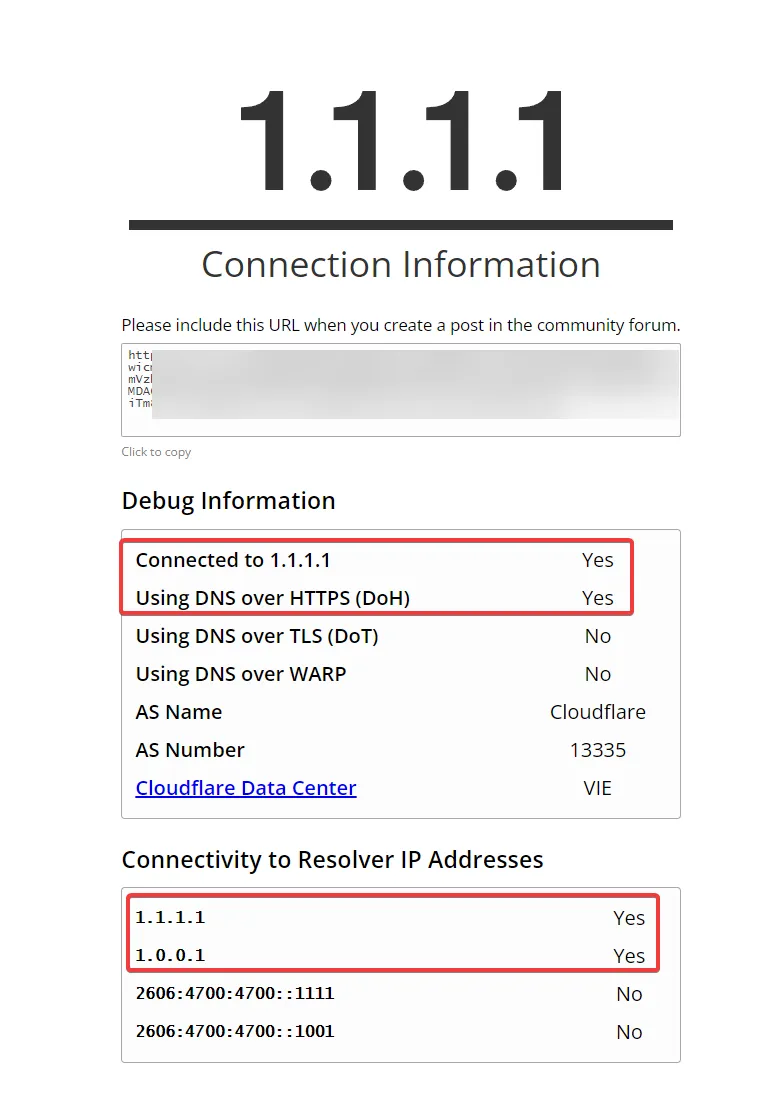
The Cloudflare connectivity test, viewed from a peer on the Mistborn tunnel. “Connected to 1.1.1.1” and “Using DNS over HTTPS (DoH)” are the two lines you want to see.
If either line is not green, the DNSCrypt service did not pick up your edit. Tail the dnscrypt-proxy container logs and confirm the server name list shows only cloudflare.
Pi-hole adlists I actually trust
Pi-hole ships with a default blocklist that is fine but not aggressive. I add two lists and stop there. More is not better; every additional list raises the chance of false positives that break a service you actually use.
OISD big list is the first one. It is curated to prioritise low false positives, which matters because the day you start whitelisting domains for a friend whose service got blocked is the day you stop trusting your own setup.
https://big.oisd.nl/domainsBlocklist Project’s “everything” list is the second. Broader sweep across ads, tracking, malware, phishing, cryptomining, and some social media domains. The false positive rate is higher than OISD, which is the price of broader coverage.
https://blocklistproject.github.io/Lists/everything.txtIn the Pi-hole admin, paste each URL into Group Management → Adlists, save, then run Tools → Update Gravity. Gravity is Pi-hole’s domain database and has to rebuild after each list change.
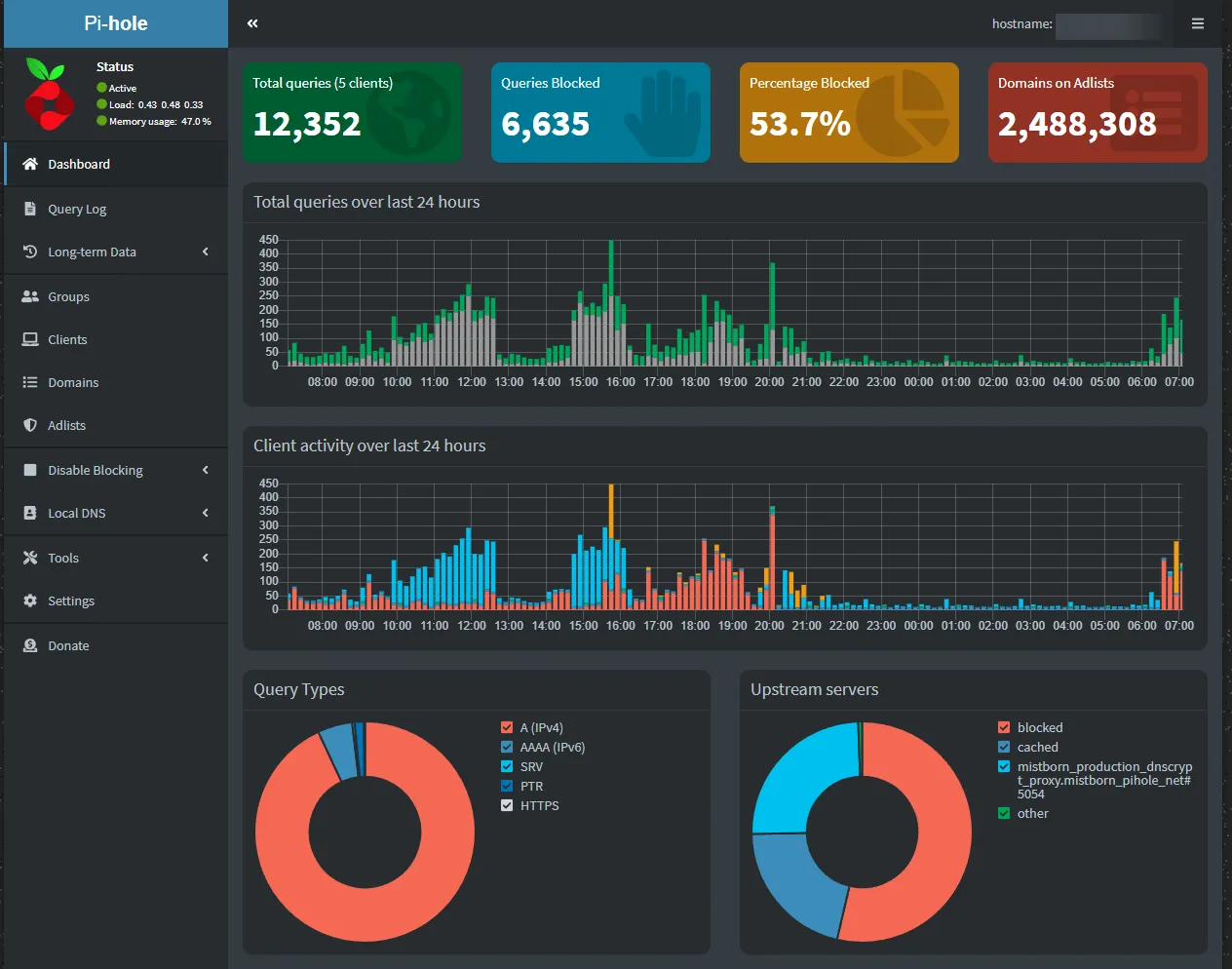
The Pi-hole dashboard a few weeks into a real deployment. Query volume tells you whether peers are actually using the tunnel; the percentage blocked tells you whether the adlists are doing useful work.
Whitelisting is the maintenance you will actually do. When a service stops working for a peer, the suspect-first move is “is the domain on a blocklist?” Pi-hole’s query log shows you the answer in 10 seconds. Add the domain to the wildcard whitelist and move on.
What I leave at defaults
The temptation with a kitchen-sink platform is to tune every dial. I leave most of them where the maintainer set them:
- The Wireguard subnet.
10.10.0.0/24by default. Changing it is a path to weeks of “why does this peer not route correctly” debugging. - The host firewall rules. The default ruleset locks the box down to the Wireguard interface and the public Wireguard listener. Adding “just one” exception is how the threat model collapses.
- The SIEM. Off by default. I leave it off on small deployments; it earns its keep on a household with 20+ devices where you actually want traffic visibility.
- Peer DNS routing. Mistborn pushes the Pi-hole resolver to every peer automatically. Do not override it on the client side, or you bypass the ad blocking entirely.
Where Mistborn beats raw Wireguard
I run both stacks for different jobs. Mistborn is the household VPN; Wireguard Easy is the lightweight per-laptop tunnel. The honest comparison:
| Need | Mistborn | Plain Wireguard |
|---|---|---|
| Web UI for peer management | Yes | Via Wireguard Easy |
| Pi-hole adlist on every peer | Automatic | Manual, separate container |
| Encrypted upstream DNS | Yes (DNSCrypt) | Manual |
| Host firewall pre-hardened | Yes | No |
| Mixes with other Docker apps | Poorly | Cleanly |
If you want the appliance, take Mistborn. If you want a tunnel that lives next to Uptime Kuma, your password manager, and three other Docker stacks on the same box, take Wireguard Easy or Wirehole instead.
Verifying the deployment
Five-minute sanity check I run on every box before trusting it:
- Connect from a fresh peer. Generate a Wireguard config in the Mistborn UI, import it on a phone, confirm the tunnel handshakes and DNS resolves through
10.10.0.1. - Test DNS leak. Visit
dnsleaktest.comfrom the connected peer. Only Cloudflare resolvers should appear. If your ISP’s resolvers leak through, DNSCrypt is misconfigured. - Test ad blocking. Visit a known ad-heavy news site. If the blocked count in Pi-hole’s dashboard does not move, gravity has not loaded the adlists.
- Test recovery. Reboot the Mistborn box. Verify peers reconnect and Pi-hole resumes blocking within 60 seconds.
Step 4 is the one people skip, and it is the one that tells you whether your installer state survived a real restart.
Closing the loop
Mistborn has been the household tunnel on my Hetzner box for the past two and a bit years. It has survived two Debian point upgrades, a handful of Pi-hole gravity rebuilds, and one DNSCrypt config-merge that needed manual fixing. Recurring cost: a 4€/month VPS and roughly two hours of attention per quarter. Recurring benefit: every device that joins the tunnel, including the smart TV and the kids’ tablets, gets DNS-level ad blocking without anyone doing anything on the device.
The companion read for the threat-model side is the human element in cybersecurity defense post. A household VPN is not a substitute for the conversations about what people click on, but it is the kind of background hardening that keeps the average day quiet.
For the strategic angle (why Mistborn is structured around Zero Trust, the CISSP/OSCP-led security model, and how the Webnestify managed-Mistborn engagement is shaped), the Mistborn Zero Trust VPN suite post is the conceptual companion to this deployment.