I started self-hosting Plausible Analytics in 2022 when a client asked me to remove Google Analytics from a German-language site after their legal team flagged the IP address logging. Since then I have rolled the same stack out across roughly 30 client environments, and the deployment has settled into a pattern I am happy to publish. This Plausible self-hosted analytics guide is the actual stack I ship: the Community Edition Compose file, Cloudflare Tunnel in front for ingress, Postmark for transactional email, and the backup discipline I wish I had committed to a year earlier.
The promise of Plausible is simple. A single-page dashboard that loads in under a second, no cookies, no consent banner, no exfiltrating client visitor data to Mountain View, and a tracker script that weighs less than 1KB. The trade-off is operational: you now run a Postgres database, a ClickHouse cluster (yes, even if it is a single node), an Elixir application, and a GeoIP updater. None of that is hard. Most of it stays out of your way once it is up. But the combination is heavier than the marketing site lets on, so plan accordingly.
About 45 minutes from a hardened Debian server to a working dashboard with the first site tracking pageviews. Most of the time is waiting for docker compose up to pull the ClickHouse image.
Why I host Plausible instead of using GA4 or the cloud version
The honest split looks like this. Plausible Cloud at 9€ per month for 10k pageviews, scaling up to 99€ for 1M pageviews, is the right answer for a single small site where you want zero operational load. Pay them, support the project, move on. Google Analytics 4 is free and remains the right answer if you actually need the Google Ads integration or the BigQuery export and your legal posture allows it.
Self-hosting Plausible earns its keep when one of these is true:
- GDPR compliance and data sovereignty. A client running an EU-facing site that does not want a cookie banner. Plausible CE on a Hetzner box in Falkenstein with a signed DPA is the cleanest answer I have found, and it has held up under three separate legal reviews from client counsel.
- Multi-site agency economics. I track 14 client sites under one self-hosted Plausible instance for around 5€ per month of VPS cost. The cloud equivalent at Plausible’s per-site pricing would be 70€ to 140€ depending on traffic. The math starts working past about 5 active sites.
- Refusing to send client data to a third party. Some clients in healthcare, legal, and education simply will not have their visitor data leave a server they control. Self-hosted is the only acceptable answer.
If none of those three apply, pay for Plausible Cloud. Their team has earned it, and you avoid the operational tax described in the rest of this post. (For the wider menu of FOSS analytics that aren’t Plausible — Matomo, Umami, GoatCounter, Pirsch — my ditch Google Analytics: open-source privacy-first alternatives post is the broader comparison.)
Prerequisites for the Plausible self-hosted analytics deployment
A short list before any of this lands on a server:
- A hardened Linux host. SSH keys only, no root login, UFW with deny-by-default. My Linux server security fundamentals post is the baseline I run on every fresh box, and the rest of this guide assumes you have followed it.
- Docker Engine. Install from the official Docker repository for Debian or Ubuntu. Don’t use the
aptdefault, don’t curl a script from somebody’s blog. The official repo is the only correct source. - A real domain with DNS in Cloudflare. I use Cloudflare Tunnel for ingress, which means no port 443 needs to be open on the server’s firewall. If you do not use Cloudflare, NPM with Let’s Encrypt works equally well; my Portainer + NPM + Vaultwarden stack is the alternative path.
- A transactional SMTP provider. Postmark is what I run; Mailgun and Amazon SES are the other two I trust. Do not use the bundled
bytemark/smtprelay in production, see the SMTP section below. - MaxMind GeoLite2 license key. Free tier, sign up at maxmind.com. The Plausible GeoIP container pulls country data from MaxMind on a 7-day cycle.
- Google OAuth credentials (optional). Needed only if you want the Google Search Console integration inside Plausible. The dashboard works fine without it.
- At least 2GB of RAM. The ClickHouse container alone idles at around 600MB and spikes higher under load. A 1GB VPS will OOM the first time you load a busy site’s dashboard.
I run production Plausible instances on Hetzner CPX21 (3 vCPU, 4GB RAM, ~7€ per month) for agency-scale multi-site setups. CPX11 (2 vCPU, 2GB RAM) is the floor for a single-site or low-traffic deployment.
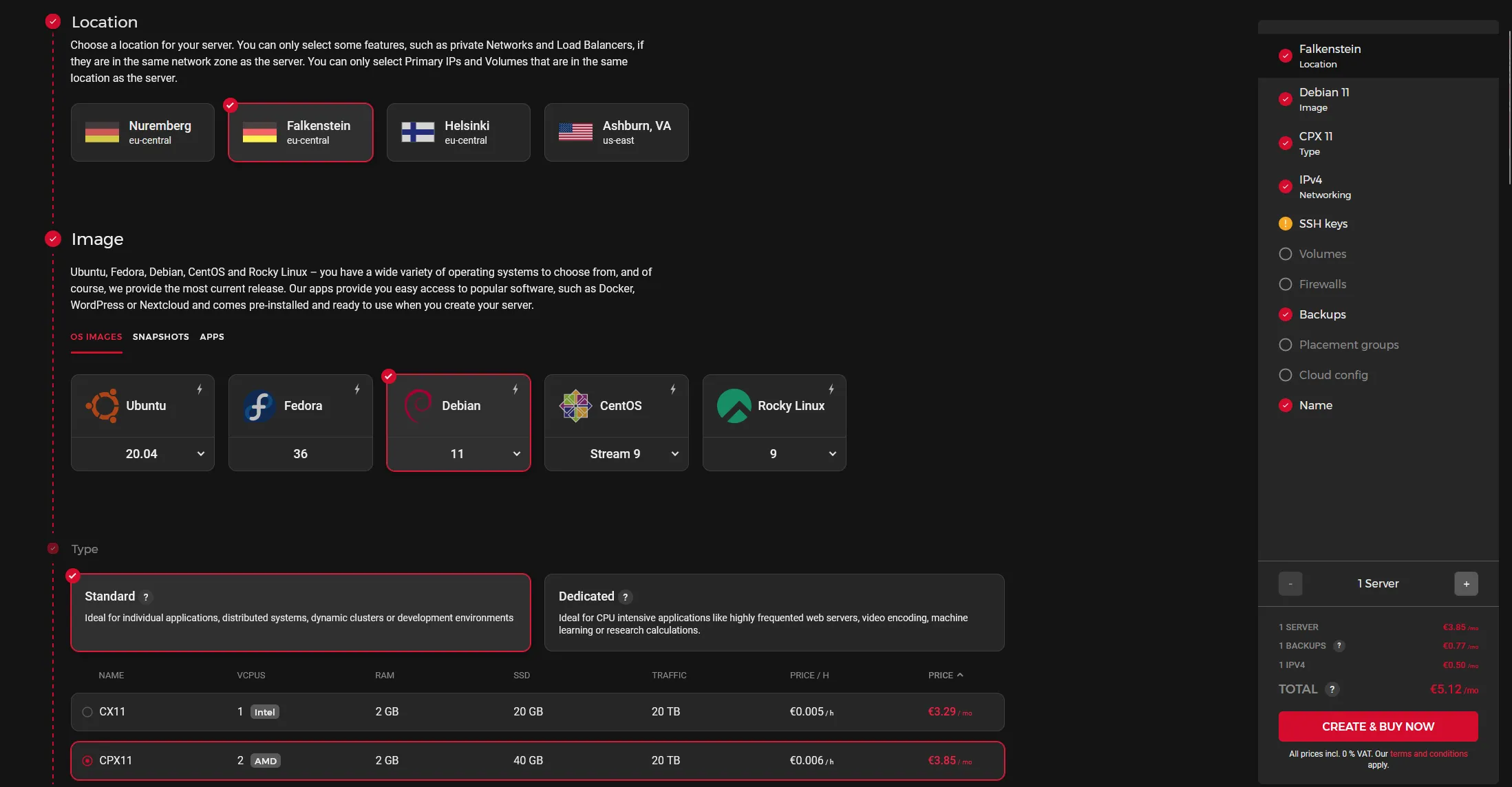
The Hetzner CPX21 sizing I default to for multi-site Plausible. CPX11 works for a single site; past five sites or 500k monthly pageviews, jump straight to CPX21.
The Plausible Compose file I actually deploy
Here is the working Compose file. It bundles four containers: Plausible itself, Postgres for application state, ClickHouse for the events database, the GeoIP updater, and the optional bytemark/smtp mailer (which I leave defined but route around in production via the SMTP env vars).
services:
  mail:
    image: bytemark/smtp
    restart: always
    labels:
      - "com.centurylinklabs.watchtower.enable=true"

  plausible_db:
    image: postgres:16-alpine
    restart: always
    volumes:
      - ./db-data:/var/lib/postgresql/data
    environment:
      - POSTGRES_PASSWORD=CHANGE_THIS_TO_A_LONG_RANDOM_STRING

  plausible_events_db:
    image: clickhouse/clickhouse-server:24-alpine
    restart: always
    volumes:
      - ./plausible/event-data:/var/lib/clickhouse
      - ./clickhouse/clickhouse-config.xml:/etc/clickhouse-server/config.d/logging.xml:ro
      - ./clickhouse/clickhouse-user-config.xml:/etc/clickhouse-server/users.d/logging.xml:ro
    ulimits:
      nofile:
        soft: 262144
        hard: 262144

  plausible:
    image: plausible/analytics:latest
    restart: always
    command: sh -c "sleep 10 && /entrypoint.sh db createdb && /entrypoint.sh db migrate && /entrypoint.sh db init-admin && /entrypoint.sh run"
    depends_on:
      - plausible_db
      - plausible_events_db
      - mail
    ports:
      - 8004:8000
    environment:
      - ADMIN_USER_EMAIL=admin@yourdomain.com
      - ADMIN_USER_NAME=admin
      - ADMIN_USER_PWD=CHANGE_THIS_TO_A_STRONG_PASSWORD
      - BASE_URL=https://analytics.yourdomain.com
      - DISABLE_REGISTRATION=true
      - SECRET_KEY_BASE=PASTE_OUTPUT_OF_OPENSSL_RAND
      - MAILER_EMAIL=plausible@yourdomain.com
      - SMTP_HOST_ADDR=smtp.postmarkapp.com
      - SMTP_HOST_PORT=587
      - SMTP_USER_NAME=YOUR_POSTMARK_SERVER_TOKEN
      - SMTP_USER_PWD=YOUR_POSTMARK_SERVER_TOKEN
      - SMTP_HOST_SSL_ENABLED=true
      - MAILER_ADAPTER=Bamboo.SMTPAdapter
      - GOOGLE_CLIENT_ID=
      - GOOGLE_CLIENT_SECRET=

  plausible_geoip:
    image: maxmindinc/geoipupdate:latest
    restart: always
    environment:
      - GEOIPUPDATE_EDITION_IDS=GeoLite2-Country
      - GEOIPUPDATE_FREQUENCY=168
      - GEOIPUPDATE_ACCOUNT_ID=YOUR_MAXMIND_ACCOUNT_ID
      - GEOIPUPDATE_LICENSE_KEY=YOUR_MAXMIND_LICENSE_KEY
    volumes:
      - ./geoip:/usr/share/GeoIP
A few notes on the values that need attention before you bring this up:
SECRET_KEY_BASE: generate it once, store it in a password manager, never rotate without coordinating a maintenance window. The command:
openssl rand -base64 64 | tr -d '\n' ; echoPOSTGRES_PASSWORD: pick a long random string. The defaultpostgresvalue in the upstream docs is the single most common mistake I see when I audit other agencies’ Plausible deployments.BASE_URL: must match the public URL Plausible serves on, includinghttps://. Plausible bakes this into the tracker script and the email links it sends. Get it wrong and password reset emails point at the wrong domain.DISABLE_REGISTRATION=true: keep it true unless you genuinely intend to run open registration. Open Plausible instances are scraped within hours.ADMIN_USER_PWD: use only alphanumeric characters here. Plausible’s admin init step fails on certain special characters in the bootstrap password; you can change it to anything after first login.
Bring it up:
docker compose up -dThe first run takes a couple of minutes. ClickHouse pulls a sizeable image, Postgres initializes its data directory, and the Plausible container waits 10 seconds before running migrations and initializing the admin user. Watch the logs:
docker compose logs -f plausibleWhen you see Running PlausibleWeb.Endpoint with cowboy 2.x.x at 0.0.0.0:8000, the application is ready.

A clean docker ps output after first boot: Plausible, Postgres, ClickHouse, GeoIP updater, and the SMTP relay all in Up state. If anything sits in Restarting, jump to the logs immediately — it’s almost always a typo in the env vars.
Putting Cloudflare Tunnel in front of Plausible
For a single-tenant analytics box I prefer Cloudflare Tunnel over opening port 443 on the firewall. The reasoning: no public ingress on the VPS, free TLS terminated at Cloudflare’s edge, and the Cloudflare WAF in front of the Plausible application by default. It also means the firewall stays at “deny incoming everything except SSH from a known IP” forever, which is the simplest threat model to operate.
The setup is two pieces: the cloudflared daemon installed on the server, and a Tunnel created in the Cloudflare Zero Trust dashboard pointed at localhost:8004 (or wherever you mapped the Plausible container in the Compose file).
Install cloudflared from Cloudflare’s apt repository:
sudo mkdir -p --mode=0755 /usr/share/keyrings
curl -fsSL https://pkg.cloudflare.com/cloudflare-main.gpg | sudo tee /usr/share/keyrings/cloudflare-main.gpg >/dev/null
echo 'deb [signed-by=/usr/share/keyrings/cloudflare-main.gpg] https://pkg.cloudflare.com/cloudflared bookworm main' | sudo tee /etc/apt/sources.list.d/cloudflared.list
sudo apt-get update && sudo apt-get install -y cloudflared
Then create the tunnel from the Cloudflare Zero Trust dashboard under Networks → Tunnels, give it a name, copy the install connector command Cloudflare generates, and run it on the server. Cloudflare hands you a one-line cloudflared service install <token> command. Paste it on the server and the tunnel registers.
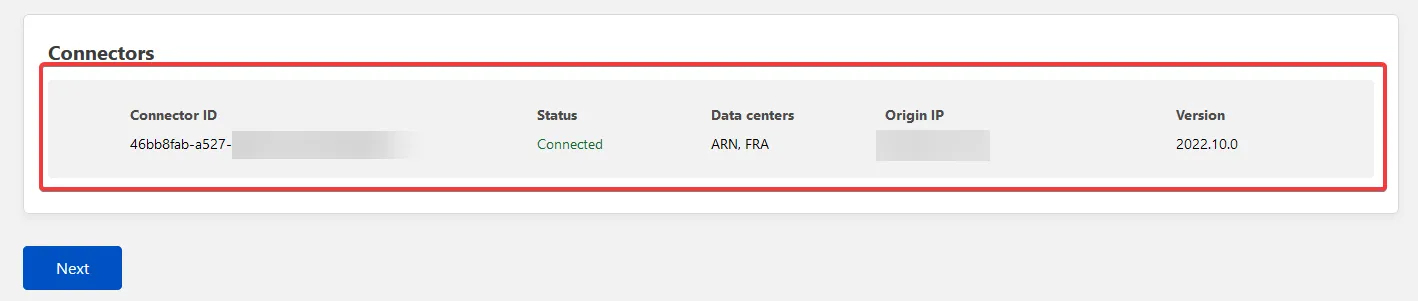
The Tunnel page showing a healthy connector. If the dot stays grey for more than 30 seconds, check that cloudflared.service is running and that outbound 443 is not blocked by the firewall — the tunnel dials out, never in.
In the tunnel’s Public Hostname tab, point your subdomain (e.g. analytics.yourdomain.com) at http://localhost:8004 and save. Cloudflare provisions the DNS record automatically. Make sure the record stays proxied (orange cloud), or the tunnel will not route. Hit the URL in a browser and Plausible’s login page should load.
One tuning note for Plausible specifically: under the Cloudflare zone’s Rules → Configuration Rules (the modern replacement for Page Rules), add a rule for analytics.yourdomain.com that disables performance and security features that interfere with the API: turn off Rocket Loader, Auto Minify for JS, and email obfuscation. The Plausible tracker script is already minified and signed; Cloudflare’s transformations break it.
SMTP that actually delivers
The single most reliable way to silently break a Plausible deployment is to leave the bundled bytemark/smtp container in place and assume it will deliver. It will, sort of, to forgiving inboxes, and then a client invitation will land in spam, and you find out two weeks later when they ask why they never got an account.
The fix is to point Plausible at a real transactional relay. Postmark is what I deploy; Mailgun and Amazon SES are the other two I trust. The Compose file above already points at smtp.postmarkapp.com:587. The full setup is three steps:
- Create a Postmark server and copy the Server API Token. That token doubles as both the SMTP username and password for Postmark.
- In Postmark’s Sender Signatures, add
plausible@yourdomain.comand verify it. SPF and DKIM onyourdomain.comare mandatory; add a DMARC record at_dmarc.yourdomain.comset top=quarantineonce you have monitored a week of reports. - Send a test email by inviting a real user from the Plausible UI. Verify it lands in Inbox, not Spam, on Gmail, Outlook, and at least one client’s domain.
If you would rather use Postmark’s API directly instead of SMTP, switch MAILER_ADAPTER=Bamboo.SMTPAdapter to MAILER_ADAPTER=Bamboo.PostmarkAdapter and add POSTMARK_API_KEY=<your-token>. Both work; SMTP is more portable across providers, the Postmark adapter has slightly better deliverability telemetry.
The backup discipline that breaks first
This is the part of every self-hosted Plausible guide I have read that gets glossed over, and it is the part I have personally got wrong twice.
Plausible has two databases. ClickHouse stores every pageview event in ./plausible/event-data. Postgres stores users, sites, goals, custom events, and the application’s entire configuration in ./db-data. Both must be backed up, and the Postgres backup is the one most people forget because the directory is small and looks unimportant.
Lose ClickHouse and you lose historical analytics. Annoying, often acceptable; customers can re-create dashboards on go-forward data. Lose Postgres and you lose every site, every user account, every goal, every team membership. The dashboard comes up empty and there is no way to reconstruct it from the events database alone.
What I do in production:
# Postgres dump, daily, retained 30 days off-site
docker compose exec -T plausible_db pg_dumpall -U postgres \
  | gzip > /backups/plausible-pg-$(date +%F).sql.gz

# ClickHouse dump using clickhouse-backup or a volume snapshot
# I use a Hetzner volume snapshot on the events-data volume,
# weekly + retention of 4 weeks
I run both via cron on the server, with the Postgres dump shipped off-server to a separate backup target via rsync over SSH. Hetzner volume snapshots cover the ClickHouse data directory at a coarser cadence because re-shipping the events database daily is wasteful and the loss window of a week of analytics has never been a real problem in practice.
Restore rehearsal is the part you rehearse before you need it. Spin up a second VPS, drop the Compose file, restore the Postgres dump into the fresh plausible_db container, restore the ClickHouse data directory into the fresh plausible_events_db volume, bring the stack up, log in, verify dashboards render. Do this once before you trust the backup script.
Sizing reality from production instances
A few numbers from the Plausible boxes I run, so you can calibrate:
- 14 client sites, ~80k aggregated monthly pageviews, CPX21 (3 vCPU, 4GB RAM): roughly 1.4GB RAM steady, ClickHouse the largest single contributor at 600-800MB. CPU under 5% at idle, brief spikes to 20% during dashboard loads with 30-day ranges.
- Single site, ~250k monthly pageviews, CPX11 (2 vCPU, 2GB RAM): running fine, but the dashboard noticeably stutters when loading 6-month aggregations. CPX21 is worth the extra 2€ if the client looks at trends often.
- Disk growth: ~1MB per 1,000 pageviews after compression. ClickHouse compresses event data aggressively. The 80k-pageview multi-tenant box has accumulated about 380MB of event data over 14 months. The Postgres database stays under 50MB.
The threat model worth thinking about for a self-hosted Plausible is straightforward. The application surface is small, the codebase is mature, and there is no user-uploaded content. The realistic risks are:
- Public exposure of the admin without registration disabled. Set
DISABLE_REGISTRATION=true. Don’t leave it asfalse“for testing”. Open instances get spammed inside hours. - Weak admin password. Plausible supports SSO via OIDC if you run Authentik; wire it in for any production-facing instance with more than two users.
- Backup gaps. Covered above. Postgres daily, off-server, restore-rehearsed.
- Tracker-script blocking. Some browser extensions and DNS-level blockers (uBlock, Pi-hole) recognize the default
/js/script.jspath and block it. Plausible’s proxy guide covers serving the script from your own domain, which sidesteps the blocker problem and bumps your captured pageviews by 20-30% on tech-literate audiences.
Verifying the deployment before handing it to a client
A short checklist before I onboard a real site:
- Add the site in the Plausible UI. Copy the tracker snippet into the site’s
<head>. Open the site in a private window. Verify the realtime dashboard ticks up within 10 seconds. - Trigger a goal, typically a form submission or an outbound link click. Verify it lands in the dashboard’s Goals tab.
- Send an invitation to a second user. Verify the invitation email arrives in their Inbox, not Spam.
- Run the Postgres backup script manually. Verify the dump is non-empty and gzipped to disk.
- Restore that dump into a fresh Plausible stack on a second VPS. Log in as the admin user. Verify the site list and historical events match.
Step 5 is the one most people skip. Do it once before you have 30 client sites depending on the same instance.
Where Plausible fits in a wider self-hosted stack
Plausible is the privacy analytics layer in the same agency stack as Mautic for marketing automation, Listmonk for newsletters, n8n for workflow automation, and Mailcow for transactional and shared email. Pair them with Uptime Kuma watching the analytics endpoint and Authentik handling SSO and you have a self-hosted growth stack with no third-party data leaks and one identity provider across the lot.
The 5€-per-month-for-14-sites unit economics are not unique to Plausible. They show up across the whole open source self-hosted catalog once you commit to the operational tax of running the stack. Plausible is one of the easier wins in that catalog because the failure modes are gentle: dashboards stop updating, nobody dies, you fix it in the morning.
Closing the loop
This four-container stack of Plausible, Postgres, ClickHouse, and the GeoIP updater has been the default analytics layer on every Webnestify-managed site for the past three years. We’ve replaced it once, on a client whose marketing team needed the GA4-to-BigQuery pipeline for a specific reporting dashboard. Everywhere else, it just runs.
The point isn’t that this is the most powerful analytics setup possible. It’s that the privacy posture is correct by default, the cost is roughly the price of a coffee per month for an agency-scale multi-tenant box, and the dashboard loads fast enough that clients actually open it. After three years of running it, the only operational rule I keep returning to is the one in the Founder’s Insight above: take the Postgres backup discipline seriously from day one, because it is the thing that breaks first when you stop paying attention.